
CDS, Data Integration, Dataflows, Model-Driven Apps, Power Platform, PowerApps

Using Power Platform Dataflows to get data from a Web API into the CDS and a Model-Driven App

October is knocking on the door which means exiting times from a Power Platform point of view. The 2019 release wave 2 is coming to us. Let us not be washed over, instead let us surf it and have some fun. There are a lot of new features and improvements to discover.

This blog post will be dedicated to the new (or rather rebranded) feature Dataflows and how you can set up a Dataflow which gets data from a Web API and writes it to the CDS. We will also create a Model-Driven App in which we can work with this data.

Continue reading “Using Power Platform Dataflows to get data from a Web API into the CDS and a Model-Driven App”
CDS, Dynamics 365, Microsoft Flow, Power Platform

Cascade from parent to child the flow way

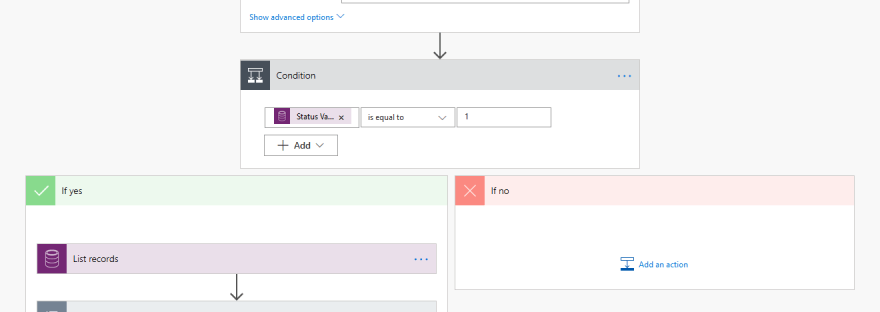
When working with Dynamics 365 CE and designing solutions, it happens from time to time that you want to cascade information from parent records to child records. One example could be to have the address of the contact updated when the address of the parent account is changed.

Continue reading “Cascade from parent to child the flow way”
CDS, Data Integration, Power Platform

Findings from exploring Data Integration in Power Platform

This is the third and last blog post in a series of three. In the first blog post I explained that you can access Data Integration from different user interfaces and overall how to get started and set up data integration projects from within the Power Apps Web Portal. In the second blog post I gave an example of how to set up a data integration project. In this blog post I will summarize my findings.

Continue reading “Findings from exploring Data Integration in Power Platform”
CDS, Data Integration, Power Platform

Getting started with Data Integration in Power Platform

This is the second blog post in a series of three. In my previous blog post I described how you can access the data integration feature from different user interfaces. Either from one of the admin centers Power Apps Admin Center or Power Platform Admin Center. You can also go to the Power Apps Web Portal. In this blog post I will describe how to set up a data integration project from the Power Apps Web Portal.

Continue reading “Getting started with Data Integration in Power Platform”